Wi-Fi Integration with ESP8266 module

  • avatar
  • 3.2K Views
  • 11 mins read
Preview image

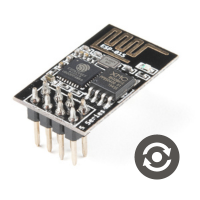
The ESP8266 has become an essential component in electronics, offering an affordable and compact means to integrate Wi-Fi connectivity into various projects. This tiny module has attracted a broad spectrum of users all aiming to implement smart home systems, IoT devices, and remote monitoring solutions. With its compact size, low power consumption, and seamless integration with Wi-Fi networks, the ESP8266 empowers innovators to create groundbreaking solutions in the digital age. The ESP8266 offers a user-friendly platform to bring your ideas to life. In this article, we will examine a particular variant of ESP8266 modules, specifically the ESP-01.

The Complete Handbook of AT Commands

  • avatar
  • 19.5K Views
  • 23 Likes
  • 11 mins read
Preview image

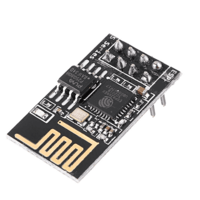
AT commands, short for Attention commands, are a set of instructions used to control modems. These commands originated from the Hayes command set and have become essential for IoT (Internet of Things) devices, especially for managing WiFi modules. They allow users to perform functions such as connecting to a network, sending data, and configuring device settings, making them crucial for IoT applications.

Interfacing USB to Serial converter module

  • avatar
  • 2.1K Views
  • 1 Like
  • 3 mins read
Preview image

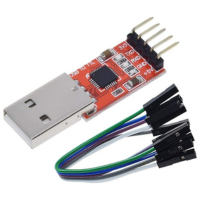
In electronic communication, the USB to UART serial converter module emerges as a crucial link, facilitating seamless data transfer between computers and UART-enabled devices. This unassuming yet indispensable device bridges the gap between USB and UART protocols. In this article, we will explore the necessity of this module, explain the user-friendly interfacing process, and highlight its critical pinout details.

 Join Our Monthly Newsletter

Get the latest news and popular articles to your inbox every month

We never send SPAM nor unsolicited emails

Getting started with Arduino Zero

  • avatar
  • 5.6K Views
  • 1 Like
  • 6 mins read
Preview image

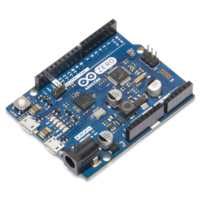
Arduino is an open-source electronics platform based on easy-to-use hardware and software. Arduino boards are able to read inputs - light on a sensor, a finger on a button, or a Twitter message - and turn it into an output - activating a motor, turning on an LED, publishing something online. You can tell your board what to do by sending a set of instructions to the microcontroller on the board. To do so you use the Arduino programming language and the Arduino Software (IDE).

Keeping real-time clock with mini DS3231 on Arduino

  • avatar
  • 12.4K Views
  • 3 Likes
  • 10 mins read
Preview image

When it comes to accurate timekeeping in the world of electronics, the DS3231 real-time clock (RTC) module is a reliable and precise solution. This compact yet robust module not only keeps time with exceptional accuracy but also integrates smoothly with popular microcontrollers like the Arduino Nano. In this article, we'll explore the features, wiring, and potential applications of the DS3231.

Using Arduino Serial Plotter tool

  • avatar
  • 4.9K Views
  • 4 mins read
Preview image

Arduino, a well-known name in the world of electronics enthusiasts, offers a user-friendly platform for experimenting with electronic projects. Within the Arduino toolkit, the Arduino Integrated Development Environment (IDE) is a crucial component, featuring a valuable tool known as the Serial Plotter. In this article, we'll explore the practical applications of the often-overlooked Serial Plotter and how it serves as a dynamic and insightful tool for visualizing real-time data in Arduino projects.

Using Arduino Serial Monitor tool

  • avatar
  • 3.9K Views
  • 1 Like
  • 4 mins read
Preview image

Arduino, a familiar name among DIY enthusiasts and electronics hobbyists, owes much of its popularity to its user-friendly Integrated Development Environment (IDE). One of the most invaluable tools within the Arduino IDE is the Serial Monitor. This feature plays a pivotal role in facilitating communication between your Arduino board and your computer, allowing you to monitor and control your projects in real-time. In this article, we'll explore the practical aspects of using the Arduino IDE and Serial Monitor, shedding light on how they can be harnessed for effective data exchange.

Play The Simpsons theme song with Arduino and a buzzer

Available to registered members only
  • avatar
  • 2.7K Views
  • 1 Like
  • 5 mins read
Preview image

The Simpsons, that legendary animated series we all know and love, has become a cultural phenomenon. With its hilarious take on family life in Springfield, it's an absolute classic. We decided to have a bit of fun and recreate the show's iconic theme song using a piezo buzzer.

Buzzer is used to generate sound, beep or even melody of a song. It can be found in alarm devices, computers, timers and confirmation of user input such as a mouse click or keystroke. A piezo buzzer is not like a regular speaker that you might think of. It uses a material that actually changes shape when you apply electricity to it which in turn creates noise. The faster you bend the material, the higher the pitch of the noise that is produced.

How to use a buzzer with Arduino

  • avatar
  • 9.8K Views
  • 2 Likes
  • 4 mins read
Preview image

A piezo buzzer is a small device that converts electrical signals into sound waves. Unlike traditional speakers, piezo buzzers operate on the piezoelectric effect. When a voltage is applied, the buzzer's piezoelectric crystal deforms, producing sound waves. This simplicity makes piezo buzzers cost-effective, lightweight, and ideal for applications where the space is limited.

Integrating membrane keypad with Arduino

  • avatar
  • 6.8K Views
  • 1 Like
  • 7 mins read
Preview image

In the world of DIY electronics, Arduino stands as a go-to tool for creators and hobbyists. Today, we're exploring the integration of a 4x4 membrane keypad module with an Arduino, a combination that introduces an interactive layer to your electronic projects.