

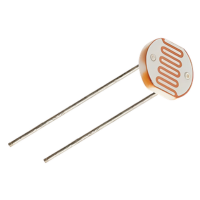

A light dependent resistor is a component that changes its electrical resistance according to how much light falls on it. Bright light makes it conduct easily, darkness makes it conduct poorly, and an Arduino can turn that difference into a number. It arrives in two forms. The raw component is a small disc with two legs, and it needs one extra resistor to work. The other form is a sensor module, a small board with the component already soldered on together with everything else the circuit needs, ready to connect to the Arduino with three or four jumper wires. Both versions do the same job and both show up in real projects. Automatic garden lights, night lights, display backlight dimming or simple daylight loggers all work on the same principle.
What is Arduino?
Arduino is an open-source electronics platform that consists of both hardware and software components. It is designed for hobbyists, students, and professionals to create interactive and programmable electronic projects. The hardware typically includes a microcontroller board with various input and output pins, allowing users to connect sensors, actuators, and other electronic components.
Need a hand with your project?Arduino Boards
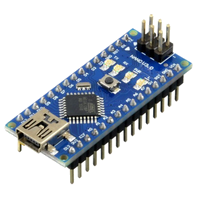
Arduino Nano
A compact board with ATmega328P, ideal for small projects. Features USB connectivity, digital, and analog pins. Versatile for space-constrained applications.
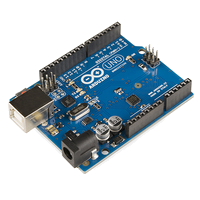
Arduino Uno
Features ATmega328P, USB connectivity, and a balanced set of digital and analog pins. Great for various electronic projects, especially for beginners.
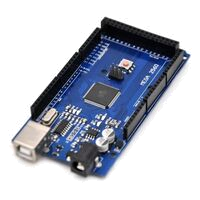
Arduino Mega
Powerful board with ATmega2560, offering numerous digital and analog pins. Suited for complex projects demanding extensive input/output capabilities.
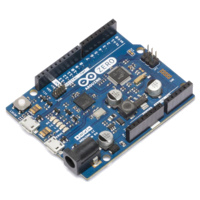
Arduino Zero
Featuring the ARM Cortex-M0+ processor, the Arduino Zero excels in tasks requiring precise control and processing power, making it ideal for space-constrained applications.
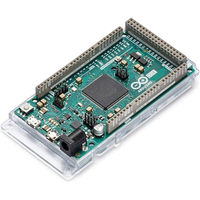
Arduino Due
The most powerful Arduino board, built around an ARM Cortex-M3 processor. With extensive input/output options and 32-bit performance, it is well suited for demanding and large-scale projects.
Arduino Modules
Arduino projects
Get your Arduino Starter KIT
Begin your Arduino journey with this Starter Kit, crafted for all experience levels. The kit equips you with essential materials, and our blog provides straightforward tutorials and circuit guides. Whether you're new or have some experience, confidently engage in Arduino projects and unleash your creativity.
- 🖐️ Master coding effortlessly with our Arduino board
- 🚀 Unleash creativity with dynamic components
- 🛠️ Plug-and-Play for easy experimentation
- 🤝 Thrive in a supportive maker community
- 💼 Enhance coding and problem-solving skills
- 🌍 Innovate anywhere with a portable design
- ✨ Impress with captivating projects, from LEDs to IoT
Arduino IDE

Arduino IDE
The core development environment for writing, compiling, and uploading code to Arduino boards. It features a built-in code editor with syntax highlighting, a library manager for extending functionality, and a board manager for configuring different hardware targets, simplifying the development workflow

Arduino Monitor
A crucial tool for debugging and communication, the Serial Monitor allows users to interact with their Arduino projects in real-time. It displays data sent from the Arduino, facilitating debugging and providing insights into sensor readings, variable values, and program flow.

Arduino Plotter
Visual representation tool, perfect for graphing data received through the serial port. This feature helps users analyze sensor readings, visualize variable trends, and debug projects by providing a graphical representation of numeric data over time, aiding in the interpretation of complex datasets.
Recent Arduino guides
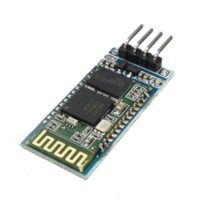
Getting started with the HC-06 Bluetooth module
Adding wireless communication to an Arduino project usually starts with a Bluetooth serial module, and the HC-06 is one of the most common choices. It's cheap, widely available, and does one job well: it lets a phone or computer connect to your board and exchange data as if the two were joined by a cable. Four pins, one operating mode, and a small set of configuration commands is the whole picture. That simplicity comes with a real constraint though, and knowing it upfront saves time later, since the HC-06 only accepts incoming connections and can't reach out to another device on its own.

Serial communication between two Arduino boards
Getting two Arduino boards to talk to each other opens up projects that a single board can't handle on its own. You might have one board reading sensors in one corner of a room and another driving a display somewhere else, and the two need to share what they know. Serial communication is one of the simplest ways to make that happen, and it works with almost any Arduino model you have lying around. This article walks through connecting two Arduino Nano boards and passing data back and forth over their serial ports.
Need more information?
Get in touch
If there is anything we can do to help, feel free to contact us.
Try to formulate your doubts and/or questions in the most detailed way possible so we can answer all of them more quickly.