
pinout


Play The Simpsons theme song with Arduino and a buzzer


Available to registered members only
  • avatar
  • 3.0K Views
  • 1 Like
  • 5 mins read
Preview image

The Simpsons, that legendary animated series we all know and love, has become a cultural phenomenon. With its hilarious take on family life in Springfield, it's an absolute classic. We decided to have a bit of fun and recreate the show's iconic theme song using a piezo buzzer.

Buzzer is used to generate sound, beep or even melody of a song. It can be found in alarm devices, computers, timers and confirmation of user input such as a mouse click or keystroke. A piezo buzzer is not like a regular speaker that you might think of. It uses a material that actually changes shape when you apply electricity to it which in turn creates noise. The faster you bend the material, the higher the pitch of the noise that is produced.

Regulated power supply module based on AMS1117

  • avatar
  • 3.1K Views
  • 5 Likes
  • 3 mins read
Preview image

We often use the power supplies like batteries or direct AC/DC supply which are normally in higher ranges compared to the actual requirement for the circuit. In that cases we need this kind of voltage regulators which can regulate and vary the voltage levels for the circuit requirement.

The AMS1117 series of chips are linear voltage regulators with low voltage drop. The modules based on the AMS1117 chip provide constant 3.3V or 5V outputs from an unregulated DC input. It's very compact and can be included in your project schema or you can use it together with a breadboard for circuit testing.

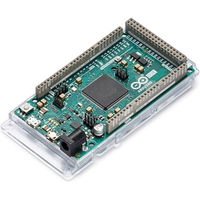
Getting started with Arduino Due

  • avatar
  • 677 Views
  • 6 mins read
Preview image

Arduino is an open-source electronics platform based on easy-to-use hardware and software. Arduino boards are able to read inputs - light on a sensor, a finger on a button, or a Twitter message - and turn it into an output - activating a motor, turning on an LED, publishing something online. You can tell your board what to do by sending a set of instructions to the microcontroller on the board. To do so you use the Arduino programming language and the Arduino Software (IDE).

 Join Our Monthly Newsletter

Get the latest news and popular articles to your inbox every month

We never send SPAM nor unsolicited emails