
Practical guide to PHP 8.5 containerization

Containerization for PHP 8.5 gives a simple, predictable and practical way to run applications without worrying about what the host machine has installed. A container bundles PHP, extensions and all required tools in one place. This helps teams keep things clean, reproducible and easy to work with. The idea is straightforward: you build an image, start containers from it and share the image when needed. PHP 8.5 brings performance improvements and a smoother developer experience, so pairing it with Docker is a natural step for modern projects.
Prerequisites
You only need a machine with Docker Engine installed and an account at Docker Hub. Once those are ready, the workflow becomes simple: create a Dockerfile, build an image, test it by running a container and push it.
Tutorial on how to Installing Docker Engine and Docker Compose
If you don't have one, signup here for an account at Docker Hub.
Creating the Dockerfile for PHP 8.5
Before writing a Dockerfile or pushing anything to Docker Hub, it helps to understand how images and containers relate. An image is a read-only template that defines the base system, installed packages and every instruction needed to launch your app. A container is the running instance of that image, holding your filesystem and process environment while your application runs. Images can be shared, tagged and reused many times, which is why they suit collaboration and CI flows.
A Dockerfile is a plain text file with instructions that describe how an image should be built. Below is a practical Dockerfile for PHP 8.5 using the official PHP FPM base image. It installs common extensions, Composer and a few packages that are useful for many PHP apps.
# Use base image: PHP-FPM, version 8.5.0
FROM php:8.5.0-fpm

# Install basic apt packages
RUN apt-get update && apt-get install -y apt-utils unzip gnupg2 libpng-dev zlib1g-dev

# Download and install composer
RUN curl -sS https://getcomposer.org/installer | php -- --install-dir=/usr/local/bin --filename=composer

# Install & enable PHP extensions
RUN docker-php-ext-install bcmath pcntl gd
This base adds PHP 8.5 FPM, tools and Composer. You can extend it with any additional requirements. The idea is to keep it small and predictable so the build stays fast and the maintenance low.
Building and testing PHP 8.5 Image
Once the Dockerfile is ready, navigate to its directory and build the image:
docker build -t php-base .
Docker reads the Dockerfile line by line and outputs the build progress. It may take a while to complete:
[+] Building 42.1s (9/9) FINISHED                                                                                                                                                            docker:default
 => [internal] load build definition from Dockerfile                                                                                                                                                   0.0s
 => => transferring dockerfile: 434B                                                                                                                                                                   0.0s
 => [internal] load metadata for docker.io/library/php:8.5.0-fpm                                                                                                                                       0.8s
 => [auth] library/php:pull token for registry-1.docker.io                                                                                                                                             0.0s
 => [internal] load .dockerignore                                                                                                                                                                      0.0s
 => => transferring context: 2B                                                                                                                                                                        0.0s
 => CACHED [1/4] FROM docker.io/library/php:8.5.0-fpm@sha256:559e1cab264b847fd752f5e85e65f0ce9fcd49b4b6b535edb54ea738ab8d56ce                                                                          0.0s
 => [2/4] RUN apt-get update && apt-get install -y apt-utils unzip gnupg2 libpng-dev zlib1g-dev                                                                                                        9.7s
 => [3/4] RUN curl -sS https://getcomposer.org/installer | php -- --install-dir=/usr/local/bin --filename=composer                                                                                     2.4s
 => [4/4] RUN docker-php-ext-install bcmath pcntl gd                                                                                                                                                  28.9s
 => exporting to image                                                                                                                                                                                 0.2s
 => => exporting layers                                                                                                                                                                                0.2s
 => => writing image sha256:7db68930f198118d0365640b01a34d525ac2bcb3bfef6ac4454d11394016a79e                                                                                                           0.0s
 => => naming to docker.io/library/php-base
When the build finishes, you can run a container from that fresh image:
docker run --name php-base -d php-base
To jump inside the container and inspect the environment:
docker exec -it php-base bash
Inside this shell you can check PHP version, installed extensions or run Composer commands.
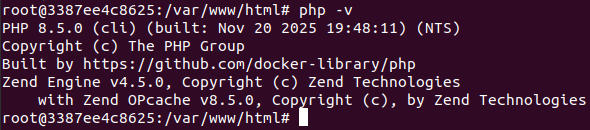 If something looks off, you can update the Dockerfile and rebuild the image.
Managing images and containers
Docker offers simple commands that let you inspect and manage your local resources. Listing images can be done with:
docker image ls
And listing containers:
docker container ls -a
Stopping and removing containers is also simple:
docker stop php-base
docker rm php-base
Removing an outdated image only takes one line:
docker rmi php-base
Getting comfortable with these basic commands speeds up your development flow and keeps your local environment tidy.
Publishing PHP 8.5 image to Docker Hub
Once the image behaves as expected, you may want to share it with your team or use it in CI pipelines. Docker Hub makes that part easy.
Start by logging in:
docker login --username=my_username
Replace my_username with your Docker Hub username and type your password when it's prompted.
Tag your image using the recommended pattern username/repository:tag. In out case, it will be:
docker tag php-base hibitdev/php-base:8.5.0-fpm
docker tag php-base hibitdev/php-base:latest
Push both tags to Docker Hub:
docker push hibitdev/php-base:8.5.0-fpm
docker push hibitdev/php-base:latest
You can now visit your Docker Hub profile and see the repository listed. Anyone with access can pull it using:
docker pull hibitdev/php-base:latest
Conclusion
Containerization with PHP 8.5 helps keep your development and production setups consistent and easier to manage. Building an image, running containers and sharing your work through Docker Hub creates a clean workflow that supports teamwork and smooth deployment practices. Once you have the fundamentals in place, it becomes straightforward to adapt this approach to any PHP project you plan to run.
Credits
Official GitHub: https://github.com/hibit-dev/php-base
Official Docker Hub: https://hub.docker.com/r/hibitdev/php-base




0 Comments