
Running PHP 8.5 with Nginx on Ubuntu

Running modern PHP applications on a stable stack is a basic requirement for most IT and development environments. Pairing PHP 8.5 with Nginx gives you strong performance, good resource usage, and solid flexibility for APIs, CMS platforms, and custom applications.
In this guide, you will install PHP 8.5 with PHP FPM, remove older PHP versions safely, manage extensions, and configure Nginx to use the new version. The steps are written for common Linux distributions such as Ubuntu and Debian, but the logic is similar on other systems.
Prerequisites
Before installing PHP 8.5, make sure you already have Nginx installed and running on your machine. If you do not have it yet, refer to the Nginx installation and configuration guide to get your server ready.
Removing old PHP versions
Before installing PHP 8.5, it is good practice to remove unused or outdated PHP versions. Running multiple versions is possible, but it often leads to confusion in production environments.
sudo apt-get purge php8.*
The example command shows how to uninstall PHP8 and related packages. Adjust the version number to the one you have installed on your computer.
Installing PHP 8.5 FPM
On Ubuntu and Debian systems, PHP 8.5 packages are usually provided through external repositories. Ondřej Surý maintains a package archive that contains compiled binaries of all current PHP versions, for Ubuntu and Debian.
sudo add-apt-repository ppa:ondrej/php
When prompted, press ENTER to proceed with adding the repository.
Then, update Ubuntu system packages list and install dependencies as shown:
sudo apt-get update
sudo apt-get install ca-certificates apt-transport-https software-properties-common
Now, with the PPA included, you can install PHP 8.5 along with its necessary dependencies:
sudo apt-get install php8.5-fpm
Finally, to check the correct installation ask for the version of PHP:
php -v
The output will be similar to the following image and show the installed version on your machine.

Installing PHP8.5 extensions
Extensions are essential for most real projects. Database drivers, image processing, caching systems, and more are provided through separate packages. To list available PHP 8.5 extension packages:
php --modules
The command to install a PHP 8.5 extension is:
sudo apt install php8.5-<extension>
You just need to replace extension with the one you want to install, e.g., mysql, curl, gd, xml, etc... PHP 8.5 extensions available by default are the listed below:
 For a typical web application, you might install:
sudo apt-get install -y php8.5-common php8.5-fpm php8.5-mysql php8.5-redis php8.5-mongodb php8.5-zip php8.5-gd php8.5-mbstring php8.5-cli php8.5-curl php8.5-xml php8.5-bcmath
Enabling PHP 8.5 on Nginx server
Nginx communicates with PHP through a Unix socket or TCP port.
Open your Nginx server block configuration file.
sudo nano /etc/nginx/sites-available/default
Inside the server block, ensure you have a PHP handling section like this:
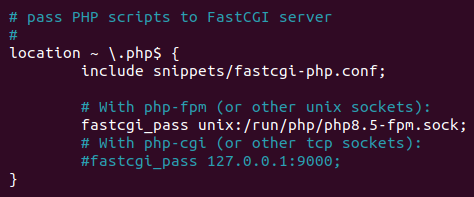 The key line is:
fastcgi_pass unix:/run/php/php8.5-fpm.sock;
Usually these directives are included but commented in the default configuration file. You will need to locate and uncomment them. Make sure to include index.php in the index directive list within the same configuration file.
 After updating the configuration, test Nginx syntax:
sudo nginx -t
If everything is correct, reload Nginx:
sudo systemctl reload nginx
We have successfully configured an Nginx server with PHP-FPM. Enjoy hosting your project on it.
Testing PHP 8.5 on Nginx server
Create a simple test file:
sudo nano /var/www/html/info.php
Add the following content:
<?php
    phpinfo();
Save the file and access:
http://your_server/info.php
You should see the PHP information page showing PHP 8.5 and the enabled extensions.
Once confirmed, remove the file for security reasons:
sudo rm /var/www/html/info.php
Conclusion
Installing PHP 8.5 with Nginx on Linux is a straightforward process when handled step by step. Cleaning old versions, installing FPM properly, managing extensions, and verifying the Nginx configuration are all part of keeping your server stable and predictable. With a clean setup and clear configuration, your PHP applications can run efficiently and stay easy to maintain over time.





0 Comments