
What is the Model Context Protocol (MCP)?

As large language models become part of development tools, internal platforms, and operational systems, expectations change. Models are no longer limited to answering questions. They are asked to read files, inspect data, and interact with services. Handling this context through informal prompt injection or custom integrations quickly leads to brittle setups. Model Context Protocol, commonly known as MCP, provides a structured way to expose context and actions to models while keeping control firmly on the application side.
Why Model Context Protocol?
Once language models started interacting with real software systems, a key limitation surfaced. Models needed consistent access to external context such as source code, configuration files, APIs, and operational tools. Early solutions relied on pushing raw data into prompts or building one off integrations. These approaches worked short term but became difficult to scale and maintain.
Fragmentation made the problem worse. Each system exposed context differently, forcing AI clients to adapt to many patterns. Tool builders lacked a standard way to describe their capabilities, and AI applications often relied on assumptions rather than explicit contracts. Safety and permission boundaries were often unclear or inconsistently enforced.
Model Context Protocol was introduced to solve these problems by defining a shared interface between systems and AI clients. It standardizes how context and actions are described and accessed, enabling predictable integrations without embedding system specific logic into prompts.
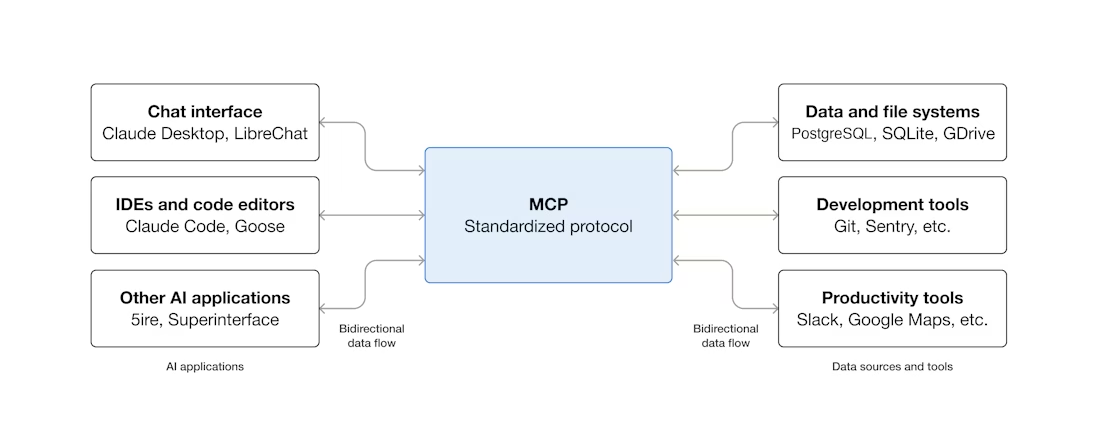
Architecture overview of MCP
Architecture concepts define the main participants in the system and how they interact, setting clear responsibilities and boundaries. Primitives define the actual elements that are exchanged between those participants, specifying what data, actions, or guidance is available to the model.
MCP Host: The host is the application embedding the AI model, such as a code editor, internal dashboard, or assistant platform. It manages and coordinates one or multiple MCP clients.
MCP Client: the client is responsible for communication with MCP servers. It handles discovery, requests resources, and invokes tools on behalf of the model, strictly following what the server exposes.
MCP Server: The server owns data or functionality. It exposes resources, tools, and prompts in a controlled way, enforcing access rules and executing requested actions.
These three roles together establish a predictable environment: the host orchestrates, the client communicates, and the server provides controlled access to capabilities.
MCP Primitives
Primitives are the core elements that MCP servers expose and that clients consume to provide models with structured context and capabilities. While architecture concepts define the who and how, primitives define the what: the actual data, actions, and guidance available to the model.
There are three main primitives in MCP:
Tools: executable actions the model can request through the client. Examples include searching a codebase, updating a feature flag, or running a report. Each tool has a name, description, input schema, and output schema. This ensures predictable execution and prevents the model from guessing payloads or endpoints.
Resources: structured data that can be retrieved or queried, such as files, logs, configuration objects, or records. Resources include schemas so clients and models understand their format and meaning.
Prompts: predefined instruction templates provided by the server. Prompts guide the model on how to reason with resources and tools without executing logic themselves
In real systems, MCP introduces a clean execution flow. A system that owns context starts an MCP server and declares available resources and tools. An AI enabled host connects through an MCP client and performs discovery.
Defining and using MCP tools
Tools are central to MCP because they allow models to act in the system. A tool definition includes:
Name and description: what the tool does
Input schema: required parameters and types
Output schema: expected results
For example, a tool named updateFeatureFlag may take a flag name and boolean value as input and return the updated flag status. When invoked, the client validates inputs against the schema, calls the server, and delivers structured output to the model.
This design prevents errors, reduces guesswork, and allows hosts to log, audit, or restrict tool usage without modifying prompts or model behavior.
Usage example
Consider a feature flag system. An MCP server exposes:
listFlags: returns all feature flags and their states.
updateFlag: changes the state of a specific flag.
If a user asks which features are enabled, the client calls listFlags and returns structured results to the model. If the user asks to enable a feature, the client calls updateFlag with validated inputs. The server executes the action and confirms success.
The same pattern applies to task management tools, reporting systems, or deployment platforms. The model focuses on reasoning and intent, while MCP handles execution through explicit contracts.
Building and connecting MCP components
Building an MCP server begins with defining resources, tools, and prompts using schemas. Once running, it provides a stable interface for any MCP compatible client.
On the client side, integration focuses on discovery and orchestration. The client dynamically adapts to the server's declared capabilities instead of relying on assumptions.
Because responsibilities are clearly separated, MCP systems are easier to extend and maintain, and new tools or resources can be added without disrupting existing workflows. MCP does not replace existing APIs or SDKs. It sits above them as a structured, AI-friendly integration layer. Internal services continue using traditional interfaces, while MCP provides a predictable surface for model interaction.
Conclusion
Model Context Protocol addresses a structural problem that emerges when AI systems interact with real software. By defining clear roles, layers, and contracts, it replaces improvised integrations with predictable patterns. MCP does not influence how models generate responses; it defines how systems expose data and capabilities responsibly. As AI becomes a core component of professional software workflows, this structure becomes essential for safe, maintainable, and scalable integrations.
Additional information available at: https://modelcontextprotocol.io




0 Comments