
Getting started with Arduino Due

Arduino is an open-source electronics platform based on easy-to-use hardware and software. Arduino boards are able to read inputs - light on a sensor, a finger on a button, or a Twitter message - and turn it into an output - activating a motor, turning on an LED, publishing something online. You can tell your board what to do by sending a set of instructions to the microcontroller on the board. To do so you use the Arduino programming language and the Arduino Software (IDE).
Over the years Arduino has been the brain of thousands of projects, from everyday objects to complex scientific instruments. A worldwide community of makers - students, hobbyists, artists, programmers, and professionals - has gathered around this open-source platform, their contributions have added up to an incredible amount of accessible knowledge that can be of great help to novices and experts alike.
Arduino DUE is a microcontroller board built for projects that need more power and speed than typical Arduino boards. It uses the Atmel SAM3X8E ARM Cortex-M3 CPU, giving it 32-bit processing capabilities. This makes it suitable for tasks like complex sensor data processing, controlling multiple motors, or running communication protocols that require fast response times.
Components
| 1x Arduino DUE (or compatible Arduino module)
|
| Arduino IDE |
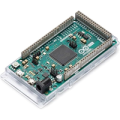

Arduino Due specification
Microcontroller | AT91SAM3X8E |
|---|---|
Operating Voltage | 3.3V |
Flash Memory | 512 KB all available for the user applications |
SRAM | 96 KB (two banks: 64KB and 32KB) |
Clock Speed | 84 MHz |
Analog Input Pins | 12 |
Analog Output Pins | 2 (DAC) |
EEPROM | 4KB |
Total DC Output Current on all I/O lines | 130 mA |
DC Current for 3.3V Pin | 800 mA |
DC Current for 5V Pin | 800 mA |
Input Voltage | 7-12V |
Digital I/O Pins | 54 (of which 12 provide PWM output) |
PCB Size | 101.52x53.3mm |
Weight | 36g |
Arduino Due pinout
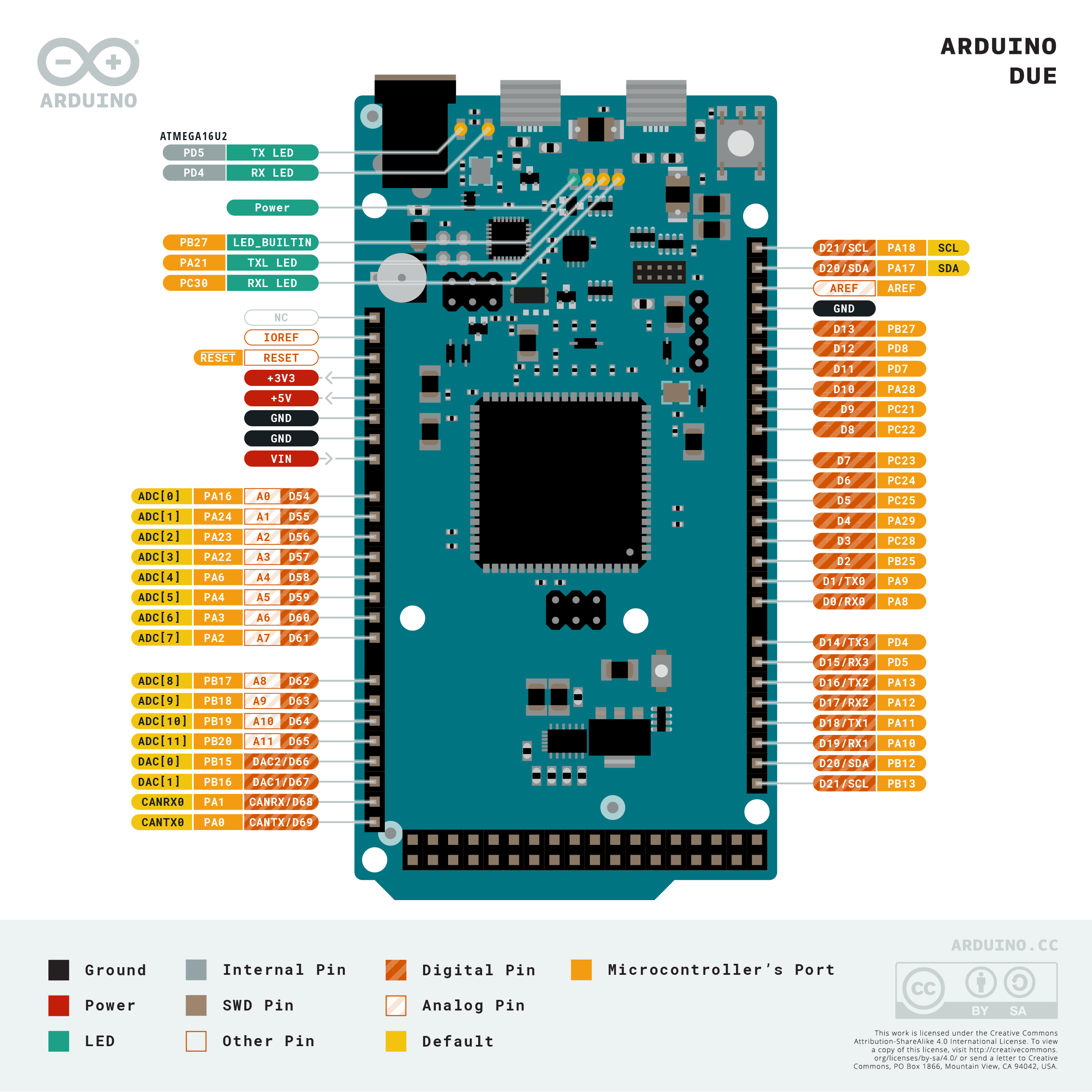 Each of the 54 digital pins on the Due can be used as an input or output, using pinMode(), digitalWrite(), and digitalRead() functions. They operate at 3.3 volts. Each pin can provide (source) a current of 3mA or 15mA, depending on the pin, or receive (sink) a current of 6mA or 9mA, depending on the pin. They also have an internal pull-up resistor (disconnected by default) of 100KOhm. In addition, some pins have specialized functions:
The board can operate on an external supply of 6 to 20 volts. If supplied with less than 7V, however, the 5V pin may supply less than five volts and the board may be unstable. If using more than 12V, the voltage regulator may overheat and damage the board. The recommended range is 7 to 12 volts.
In addition, some pins have specialized functions:
Serial pins used to receive (RX) and transmit (TX) TTL serial data. Pins 0 and 1 are also connected to the corresponding pins of the ATmega16U2 USB-to-TTL Serial chip.
Serial: 0 (RX) and 1 (TX)
Serial 1: 19 (RX) and 18 (TX)
Serial 2: 17 (RX) and 16 (TX)
Serial 3: 15 (RX) and 14 (TX)
PWM: 2 to 13. Provide 8-bit PWM output with the analogWrite() function.
SPI: these pins support SPI communication using the SPI library. The SPI pins are broken out on the central 6-pin header, which is physically compatible with the Uno, Leonardo and Mega2560.
CAN: CANRX and CANTX pins support the CAN communication protocol but are not not yet supported by Arduino APIs.
TWI: 20 (SDA) and 21 (SCL). Support TWI communication using the Wire library. SDA1 and SCL1 can be controlled using the Wire1 class provided by the Wire library. While SDA and SCL have internal pullup resistors, SDA1 and SCL1 have not. Adding two pullup resistor on SDA1 and SCL1 lines is required for using Wire1.
LED: 13. There is a built-in LED connected to digital pin 13. When the pin is HIGH value, the LED is on, when the pin is LOW, it's off.
The Due has 12 analog inputs, each of which can provide 12 bits of resolution (i.e. 4096 different values). By default, the resolution of the readings is set at 10 bits, for compatibility with other Arduino boards.
There are a couple of other pins on the board:
AREF. Reference voltage for the analog inputs. Used with analogReference().
Reset. Bring this line LOW to reset the microcontroller.
Arduino IDE
The open-source Arduino Software (IDE) allows you to write programs and upload them to your board. This software can be used with any Arduino board and it's compatible with most operating systems. It is available for downloading on the official Arduino website.
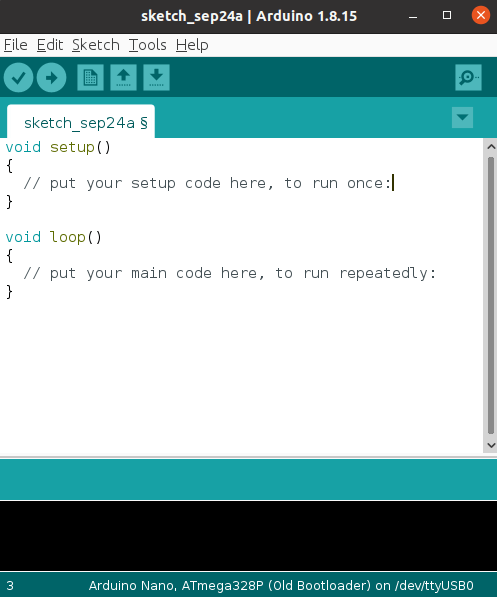 As you can see, the interface is very simple and easy to use. The most used buttons are available on the top (from left to right):
Verify: verify your sketch for errors and try to compile it
Upload: verify, compile and upload the sketch to the Arduino board
New: create a new sketch
Open: open already existing sketch
Save: save open sketch
Serial Monitor: I/O interface to communicate with the board
Arduino sketch
A sketch is a program written with the Arduino IDE. Sketches are saved on the development computer as text files with the file extension .ino.
A minimal Arduino C/C++ program consists of only two functions:
setup(): This function is called once when a sketch starts after power-up or reset. It is used to initialize variables, input and output pin modes, and other libraries needed in the sketch.
loop(): After setup() function exits/ends, the loop() function is executed repeatedly in the main program. It controls the board until the board is powered off or is reset.
Conclusion
Arduino DUE offers a balance of performance, flexibility, and accessibility. It opens up possibilities for projects that go beyond basic experimentation while remaining approachable for enthusiasts and developers. Its features support both creative and technical applications, making it a practical choice for anyone interested in electronics or programming.



0 Comments