Push button


Integrating membrane keypad with Arduino

  • avatar
  • 6.7K Views
  • 1 Like
  • 7 mins read
Preview image

In the world of DIY electronics, Arduino stands as a go-to tool for creators and hobbyists. Today, we're exploring the integration of a 4x4 membrane keypad module with an Arduino, a combination that introduces an interactive layer to your electronic projects.

Using touch sensor with Arduino

  • avatar
  • 4.4K Views
  • 4 mins read
Preview image

Touch sensor (also known as touch button) is widely used to control devices. It detects touch, force or pressure on its surface changing the logic state of the circuit. Actually, it works in very similar way as to buttons. Checkout the wiring and Arduino code implementation to track the current state and the state changes.

Using switch buttons with Arduino

  • avatar
  • 3.7K Views
  • 3 Likes
  • 4 mins read
Preview image

Let's speak now about switch buttons, the wiring and how to implement the code for this circuit elements in Arduino. Switch buttons connect two points in a circuit when you press them and maintain the state without the need to keep the button pressed. That means that logic state of the circuit change every time you press the button.

 Join Our Monthly Newsletter

Get the latest news and popular articles to your inbox every month

We never send SPAM nor unsolicited emails

How to use the AD Keyboard module with Arduino

  • avatar
  • 1.7K Views
  • 7 mins read
Preview image

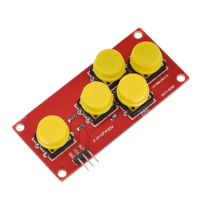
When working on simple Arduino projects that need basic navigation or input, the AD keyboard module is a handy little tool. It's a 5-button unit that behaves like a directional pad, with four arrow-style buttons and one additional button. It doesn't require any soldering or setup, which makes it a practical choice for prototyping or small projects. You can plug it in and start using it right away, thanks to its three-pin layout and built-in resistors.